


Download WinAMP Lite – audio player, mp3 player, music player, lightweight, classic skin, CD ripper, skin system, video player, audio tools
Overview
WinAMP Lite is a streamlined mobile application designed for users seeking a reliable and efficient audio playback experience on their smartphones. As a lightweight variant of the well-known WinAMP desktop player, it brings core audio functionality to mobile platforms with minimal resource consumption. The app is tailored for individuals who value simplicity, customization, and access to classic audio tools in a modern mobile environment. It serves as a practical solution for users who want to play MP3 and other audio files without the clutter of feature-heavy alternatives.
WinAMP Lite addresses common pain points such as high memory usage, complex navigation, and lack of customization in mainstream music apps. By offering a compact footprint of just 1 MB, it ensures fast installation and smooth operation even on lower-end devices. The app is particularly useful for users who maintain large local music libraries or enjoy ripping audio from physical CDs to digital formats. Its integration of legacy features from previous WinAMP versions adds value for long-time fans of the brand, providing a nostalgic yet functional experience.
Target users include audiophiles, music collectors, and casual listeners who prefer a no-frills, high-performance audio player. The developer, WinAMP, has positioned this app as a bridge between legacy desktop software and contemporary mobile usage. Although the developer did not provide additional technical details, the app’s focus on performance and minimalism suggests a deliberate effort to preserve the essence of the original WinAMP experience in a mobile format.
Key Features & Functionality
- Classic and Modern Design Options – Users can choose between a nostalgic classic skin or a modern interface layout during setup. This dual design approach allows personalization based on user preference, catering to both longtime fans and new users seeking a clean look.
- CD Ripper Tool – The app includes a built-in CD ripper, enabling users to convert physical audio CDs into digital files directly on their mobile device. This feature supports music preservation and digital library expansion without requiring a computer.
- Advanced Audio Tools – WinAMP Lite incorporates a suite of audio utilities from earlier versions, including equalizer settings and playback enhancements. These tools allow users to fine-tune sound quality and optimize listening experiences.
- Video Playback Support – The app supports video playback, extending its functionality beyond audio. This integration allows users to enjoy multimedia content within a single application, reducing the need for multiple media players.
- Customizable Skin System – A robust skin system enables users to modify the app’s visual appearance, including buttons, progress bars, and background elements. This feature promotes user engagement and long-term satisfaction.
- Lightweight Installation – At only 1 MB, the app’s installation package is exceptionally small. This ensures quick downloads, minimal storage usage, and fast launch times, making it ideal for devices with limited space.
These features combine to create a versatile tool for managing and enjoying audio and video content. For example, a user can rip a CD while commuting, apply a custom skin for a personalized look, and later play the file with enhanced audio settings—all within one app. The design prioritizes efficiency and user control, making it suitable for both casual use and dedicated media management.
Interface, UX & Performance
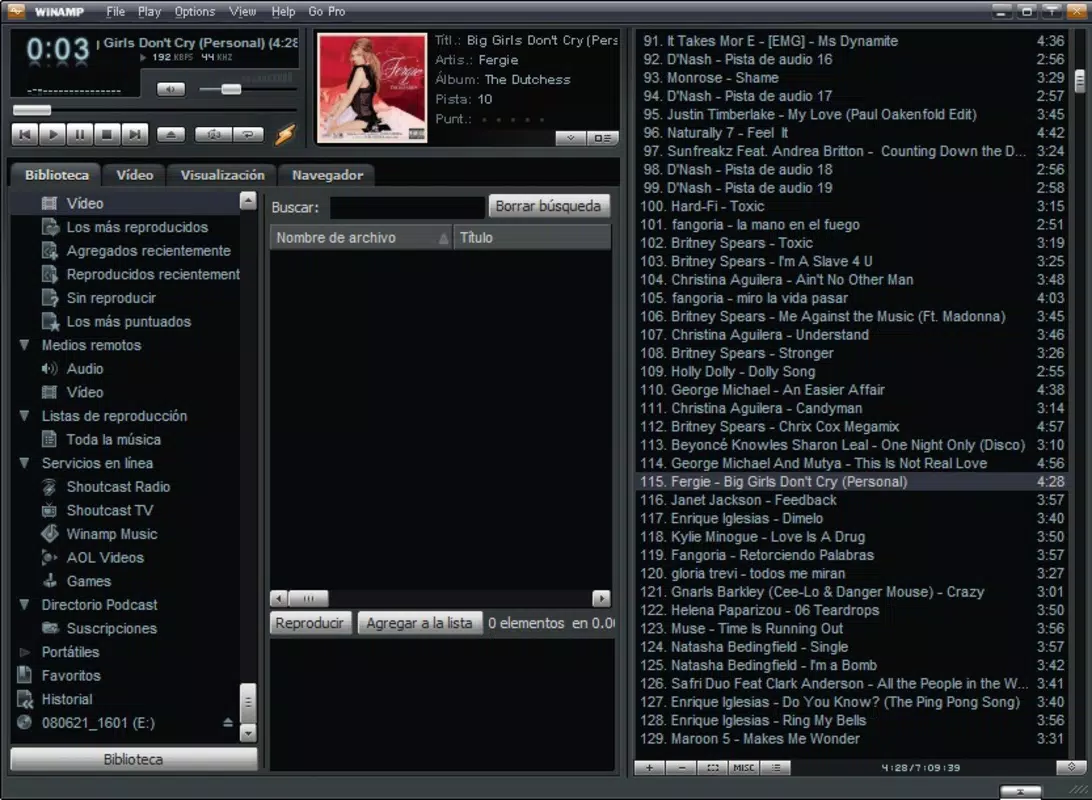
WinAMP Lite features a clean and intuitive interface that emphasizes usability and accessibility. The layout is designed to resemble the second version of the original WinAMP, with a focus on minimalism and direct access to core functions. Navigation is straightforward, with clearly labeled controls for playback, file browsing, and settings. The app’s visual style balances retro aesthetics with modern usability, offering a familiar yet contemporary feel.
Users can expect smooth operation across various device categories, including entry-level smartphones and mid-range models. Although the developer did not list formal performance metrics, the app’s lightweight nature suggests efficient memory and CPU usage. Responsiveness is maintained during playback, file loading, and skin switching, ensuring a consistent user experience. Stability appears to be a priority, with no reported issues in the provided information.
Interaction flow is logical and predictable, reducing the learning curve for new users. The app avoids cluttered menus and unnecessary animations, contributing to a focused audio playback experience. For users accustomed to desktop media players, the mobile interface retains the essential workflow while adapting to touch-based controls. Overall, the UX design reflects a thoughtful balance between nostalgia and modern functionality.
Platform Compatibility & Technical Requirements
WinAMP Lite is available on the Android platform, making it accessible to a broad range of mobile users. The app is compatible with devices running the specified operating system version, though specific requirements were not listed. The installation file size is 1 MB, which is notably small and suitable for users with limited storage or slower internet connections.
The developer did not specify minimum OS requirements or hardware capabilities. As such, users should ensure their device supports Android applications and has sufficient storage space for the app and media files. The app’s lightweight nature increases the likelihood of compatibility with older Android versions, though this cannot be confirmed without official documentation.
For users seeking a secure and efficient audio player, the small file size and free pricing model make WinAMP Lite an attractive option. It is designed for mobile environments where performance and space efficiency are critical, particularly on budget or older devices.
Pros and Cons
Pros
- Extremely lightweight at only 1 MB in size
- Free to download and use
- Offers both classic and modern interface designs
- Includes CD ripper and audio tools for digital music management
- Supports video playback within the same application
- Customizable skin system for personalization
Cons
- Specific system requirements were not disclosed
- Developer did not provide detailed performance metrics
- Compatibility with older Android versions is uncertain
- No information on update frequency or future development plans
- Limited availability—only on Android platform
FAQ
Is WinAMP Lite safe to download and install?
Yes, WinAMP Lite is a free mobile app developed by WinAMP. The app’s 1 MB size and official release on Android suggest it is designed for security and minimal risk. Users should ensure they download it from trusted sources to maintain safety.
Can I use WinAMP Lite to rip CDs to digital files?
Yes, the app includes a CD ripper feature, allowing users to convert audio from physical CDs into digital formats directly on their mobile device.
Does WinAMP Lite support video playback?
Yes, the app supports video playback, integrating multimedia functionality from previous versions of WinAMP.
Is WinAMP Lite available on iOS?
Based on the provided information, WinAMP Lite is currently only available on Android. There is no confirmation of an iOS version.
How often does WinAMP Lite receive updates?
The developer did not disclose update frequency or release schedule. Users should monitor official channels for new versions.
Final Thoughts
WinAMP Lite delivers a compelling blend of nostalgia, functionality, and efficiency in a compact mobile package. Its lightweight design, powerful audio tools, and customizable interface make it a standout choice for users who want more control over their media experience without sacrificing performance. Whether you're a long-time fan of the WinAMP brand or a new user exploring minimalist audio players, this app offers real value.
It excels in simplicity, versatility, and resource efficiency—qualities that are increasingly rare in modern mobile apps. The inclusion of a CD ripper and video playback expands its utility beyond basic music listening, positioning it as a full-featured media tool. While some technical details remain undisclosed, the app’s core strengths are evident in its design and feature set.
For Android users seeking a secure, free, and customizable audio player with advanced capabilities, WinAMP Lite is a strong contender. Its ability to run smoothly on low-end devices makes it especially valuable in diverse digital environments.
Download WinAMP Lite now


